



Your TikTok follower count is one of the strongest public signals of credibility, yet creators often see inconsistencies and rounding that make it hard to measure growth precisely. If you need reliable numbers for reporting, campaign planning, or to evaluate a growth push, here are the most accurate ways to track your TikTok followers count and turn it into actionable insight.
What “accurate” really means on TikTok
Before you choose tools, align on the metrics and quirks that matter:
- Total followers, the headline number on your profile. TikTok often abbreviates this on profile screens, for example 1.2K or 3.4M, which is not the exact integer.
- Net followers, new followers minus unfollows over a time window. This is what you need to understand momentum and real growth.
- Update cadence, TikTok Analytics typically refreshes data roughly every 24 hours, and some datasets can lag longer. Multiple reputable guides note a delay in reporting, so do not expect real time precision inside Analytics (Hootsuite and Later both cover these timing nuances).
- Platform audits, periodic removals of spam or inactive accounts can cause dips. Treat these as hygiene corrections rather than performance failures.
The most accurate place to check your follower count
The single source of truth is TikTok itself. Use both your public profile and the Analytics suite to reconcile exact values and growth.
1) Your public profile, quick but sometimes rounded
Open your profile to see your total follower count. This is the fastest snapshot, but numbers may be abbreviated and cached for short periods. If you need the exact number and a growth breakdown, move to Analytics.
2) TikTok Analytics, the best source for exact totals and net change
Analytics lives in Creator Tools for Creator and Business accounts. It provides your total followers, net follower change, and a timeline view.
How to access on mobile:
- Go to your profile and tap the menu in the top right.
- Tap Creator tools, then Analytics.
- Open the Followers tab to view total followers and net follower change across selectable ranges.
You can also manage a Business Account if you want broader insights and posting utilities, TikTok outlines Business Account benefits on its official site (TikTok for Business).
Accuracy notes:
- Analytics numbers are authoritative for totals and net change, but expect reporting delays of up to a day, and occasionally longer for some breakdowns. Cross check week over week rather than hour by hour.
- Use consistent date ranges when comparing periods, for example the last 7 complete days, to avoid partial days skewing comparisons.

Trusted third‑party dashboards, when and how to use them
Third‑party tools help centralise reporting across platforms and allow exports, scheduling, and role‑based access. For follower counts, choose tools that authenticate with TikTok through authorised connections rather than scraping.
Good options to consider:
- Hootsuite, offers TikTok analytics dashboards and frequent guidance on data delays and best practice (overview guide).
- Sprout Social, supports TikTok analytics in broader reporting stacks, useful for teams and agencies (product page).
- Later, provides accessible analytics roundups and tutorials that align with TikTok’s own definitions (analytics guide).
What to look for in a tool:
- Uses TikTok login or partner authorisation, not password sharing or scraping.
- Lets you export day‑level follower totals and net change, so you can calculate growth rates.
- Time zone control and consistent date windows.
- Audit trails for who changed what, helpful in teams.
Note on public trackers: sites like Social Blade give directional trends based on public profiles. They are useful for competitive checks, but they can lag or miss reversals, so treat them as directional rather than definitive (Social Blade).
Build a simple, accurate tracking workflow
For most creators and small brands, a lightweight system outperforms complicated stacks. Here is a proven approach you can implement in under 15 minutes.
Step 1, Pick a single daily check time
Choose a time you can stick to, for example 9am local, then always record after that time. Consistency reduces noise from partial‑day fluctuations.
Step 2, Log two values
- Total followers from TikTok Analytics or your profile if it shows exact numbers.
- Net follower change from the Analytics Followers tab for the previous complete day, if available.
Step 3, Use a minimal sheet
Create columns for Date, Total followers, Net change, Videos posted, Notes. Add two calculated fields:
- Daily growth rate, Net change divided by prior day total.
- 7‑day moving average, Average of the last seven Net change values to smooth volatility.
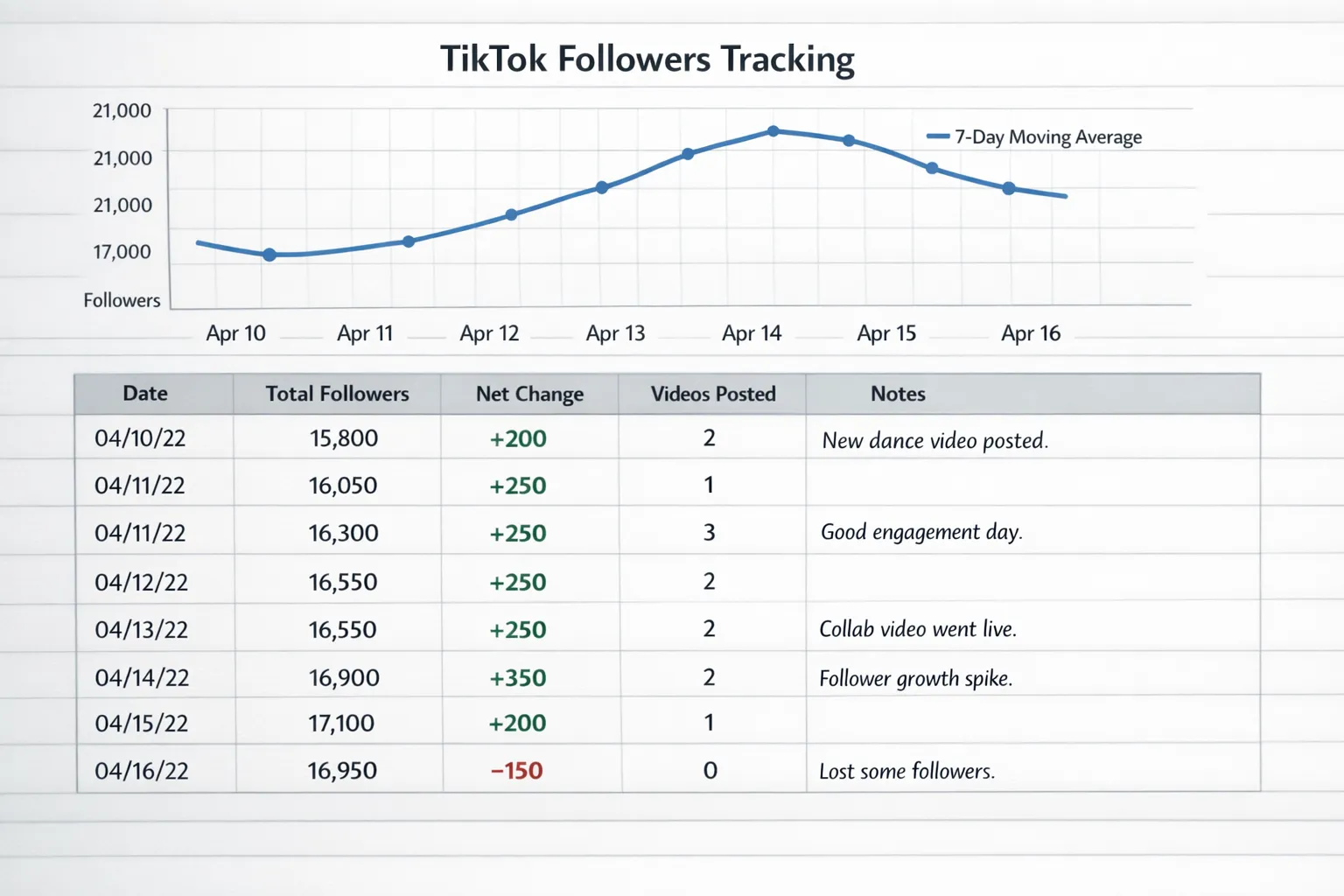
Step 4, Annotate key events
Mark when you post, when a video goes viral, collab drops, paid boosts, live sessions, or account changes. You will see patterns, for example growth spikes 12 to 36 hours after high watch time posts.
Step 5, Review weekly, decide monthly
Weekly reviews help you steer content. Monthly reviews help you decide whether to scale efforts, test new formats, or add growth accelerators.
Quick comparison of tracking methods
| Method | Where to find | Update cadence | Accuracy notes | Best for |
|---|---|---|---|---|
| Profile follower count | TikTok profile header | Near real time | Often abbreviated, sometimes cached | Quick checks |
| TikTok Analytics, Followers tab | Creator tools, Analytics | Roughly daily refresh | Authoritative totals and net change, with reporting delay | Accurate reporting and trend analysis |
| Partner dashboards (Hootsuite, Sprout, Later) | Connected via TikTok login | Mirrors TikTok refresh | Export friendly, standardises reporting across channels | Teams and agencies |
| Public trackers | Public web | Varies by site | Directional, can lag or round | Competitor trends |
| Manual spreadsheet | Your sheet | As you log it | Accuracy depends on your inputs | Custom metrics and annotations |
Make follower count actionable, not just visible
Follower totals are a lagging indicator, useful for credibility. Pair them with leading indicators to optimise content decisions:
- Follower conversion rate, new followers divided by video views over a period. This shows how efficiently content converts attention into audience.
- Growth per post, net followers gained divided by number of posts in the period. Use this to compare formats on a level field.
- Retention after spikes, track how many followers remain two weeks after a viral post to understand stickiness.
When you test a new content series or timing strategy, evaluate by these ratios, not just raw totals.
Troubleshooting common count issues
- Count looks stuck or rounded, check Analytics for the exact total and wait for the daily refresh. Profile views can cache.
- Sudden dip, review TikTok’s notices and check community guideline status. Platform audits periodically remove spam or inactive accounts, you may see a one‑off correction.
- Conflicting numbers across tools, prioritise TikTok Analytics. Third‑party dashboards can lag by a cycle or apply different time zones.
- Team logging differences, set a single time zone and a fixed daily logging time. Include it in your sheet header.
Accuracy and compliance best practice
- Avoid scrapers and unofficial apps that request your password. Use TikTok login and reputable partners only.
- Limit admin access in third‑party tools to those who need it, rotate passwords if team members change.
- Document your methodology in your sheet, time of day, data source, time zone. It makes reports auditable and repeatable.
When to consider a growth accelerator
If your analytics show strong content metrics but slow follower momentum, that is a signal you may be under‑exposed. As we covered in our posts on why growing on Instagram and TikTok feels harder and how to grow on social media faster, social proof and early traction influence both human behaviour and algorithmic distribution. Accurately tracking your baseline makes it easier to measure the lift from any growth push and attribute results with confidence.
Use your tracking sheet to establish a two to four week baseline, then compare net followers and conversion ratios after you test a growth accelerator. That way, you are not guessing, you are measuring.
Frequently Asked Questions
Why does my TikTok follower count round to 1.2K or 3.4M? TikTok often abbreviates public counts for readability. For exact totals and net change, use the Followers tab inside TikTok Analytics.
Is TikTok Analytics real time? No. Most metrics refresh roughly every 24 hours, and some breakdowns can lag longer. This is normal behaviour documented by multiple analytics guides and partner tools.
Which is more accurate, third‑party tools or TikTok Analytics? TikTok Analytics. Third‑party dashboards are useful for exports and team reporting, but if numbers conflict, trust TikTok’s own analytics.
How often should I log my followers? Daily at a consistent time is ideal. Weekly summaries are useful, but daily logs let you correlate gains with posts and campaigns more precisely.
Why did my followers drop overnight? Platforms periodically remove spam or inactive accounts. You may also see dips after viral spikes as casual viewers churn. Look at multi‑day trends, not single days.
Can I automate follower tracking with scripts or scrapers? Avoid unofficial scraping. It can violate terms and lead to inaccurate or blocked data. Use TikTok’s own analytics and authorised partner tools instead.
Ready to measure, then scale?
Set up your follower tracking today, then use it to evaluate what works, content decisions, timing, collaborations, and whether a growth accelerator makes sense. When you are ready to add momentum, explore TikTok growth options with ViralShift, fast, simple checkout and digital delivery designed for creators and businesses. Start here: ViralShift.